Kid Timer Lock
A downloadable utility for Windows
KidTimerLock is a lightweight Windows app that lets you set a countdown timer after which the PC is automatically locked. It’s great for avoiding arguments with your little darlings over when it's time to finish using their (or your) computer.
You could also use it to remind yourself it's time to go and do something else, or to lock the computer after a certain time if you had to leave it unattended for some reason.
I wrote this to solve my own problem with offspring who had difficulty respecting agreed boundaries when it came to computer use. Now there are no more arguments! Please note, this is not a very sophisticated solution and is intended for younger children. Older and more tech-savvy kids will find ways around this. I didn't want to make something really aggressive that you will struggle to remove, or will trigger anti-viruses!
Pricing
KidTimerLock is completely free of charge and the source code is available on GitHub (see below). However donations on a "name your price" basis are appreciated as this stuff takes time and effort. You can also donate via PayPal.
Current version
Version 0.5.0, released 23rd September 2025. This is the first version, PLEASE report any bugs below, they are welcome!
Requirements
- Any recent Windows version
- .NET Desktop Runtime 6.0 or later - you may already have this installed, or you will be prompted to do so.
Features
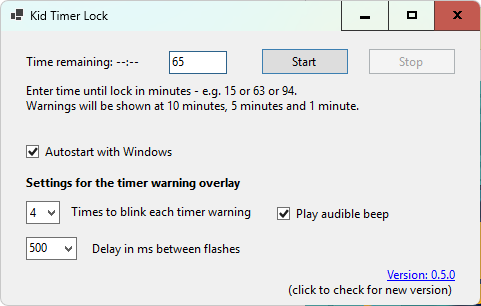
- Countdown timer with Start/Stop controls.
- Locks workstation (equivalent to Windows + L keypress) when countdown expires
- Flashing warnings at several intervals before lock - currently 10, 5 and 1 minute - will be configurable in future
- Global hotkey (currently Ctrl + Alt + L - configurable in future, let me know if you are getting hotkey registration errors) to show/hide app. App not visible in taskbar
- Configurable flash duration and count
- Optional audible beep
- Runs silently in background
Getting Started
1. Download the ZIP and extract all the files to a permanent folder, e.g. Program Files/KidTimerLock - or you can run it fully portably from anywhere provided all the files are extracted. Just don't enable "Autostart with Windows" if you are using temporary media like a USB.
2. Run `KidTimerLock.exe` - please note *if you get a "Windows protected your PC" message this is because we do not yet have a signature for this app, like a lot of small software companies. Just click "More info" and then "Run anyway". Of course you should check any file for viruses, it's good practice.
3. This app has just one main form for simplicity. Enter minutes till lock - no hours or seconds, just round minutes, e.g. 10, 75, 90 etc.
4. Press Enter (or Start button) - the form will disappear and not be easily found by a child or casual tinkerer
5. Press hotkey combination (currently Ctrl + Alt + L) to show the form again and see remaining time or Stop the timer. We may add password protection in the future. This hotkey combination should generally not be occupied on your system but if it's a problem for people we will make this customisable.
6. Other settings are self-explanatory (tooltips contain further info)
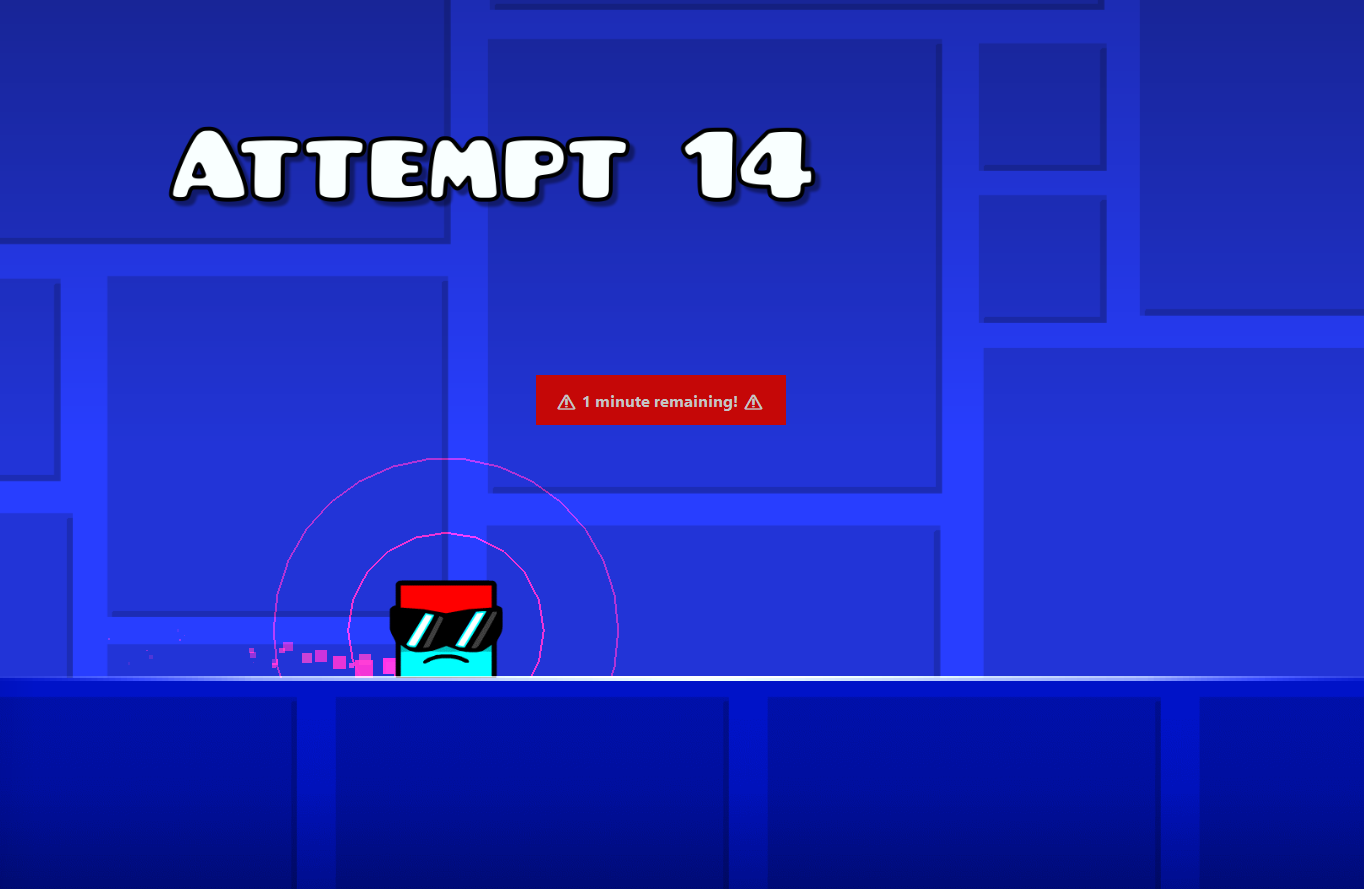
7. At 10, 5 and 1 minute a red warning will appear overlaid on the screen along with a beep, warning that there are X minutes left until lock. It will flash the number of times and at the rate you have specified in the settings - you may want it to be as unobtrusive as possible, or maybe your kids need a less subtle warning with more flashes! Note: this overlay may fail to appear in games running in fullscreen mode so better to set games to run in a Windowed mode.
8. On timer expiry Windows will lock, as if you had pressed Windows Key + L - so verify the behaviour of this first!
9. When you log back in, the app will still be running in the background and can be summoned with the hotkey combination if required again. You can kill it in the Task Manager (don't tell the kids that!) but it is extremely resource-light so there is no real need.
---
License
MIT License — Free for personal use and modification. Source code available at https://github.com/dobbobbs/KidTimerLock. Compiled .exe and accompanying files can be downloaded here on a "Name your price" basis. All purchases are much appreciated as this is maintained in my spare time, which I have very little of, and I hope you will find this app as useful as I have!
---
Support
Found a bug or have feedback? Post below or open an issue on the GitHub page.
KidTimerLock is developed and maintained by Mark Daniels. I appreciate any code improvements provided by the community, things got a little spaghetti as I chopped and changed this project a number of times before settling on this implementation, and this started life as a personal hobby project. Some boilerplate code was also produced by ChatGPT so yeah, still needs to be tidied up.
Download
Click download now to get access to the following files:
Leave a comment
Log in with itch.io to leave a comment.